We tried to verify a UK company in ChatGPT's Business Hub. It stopped at one field.

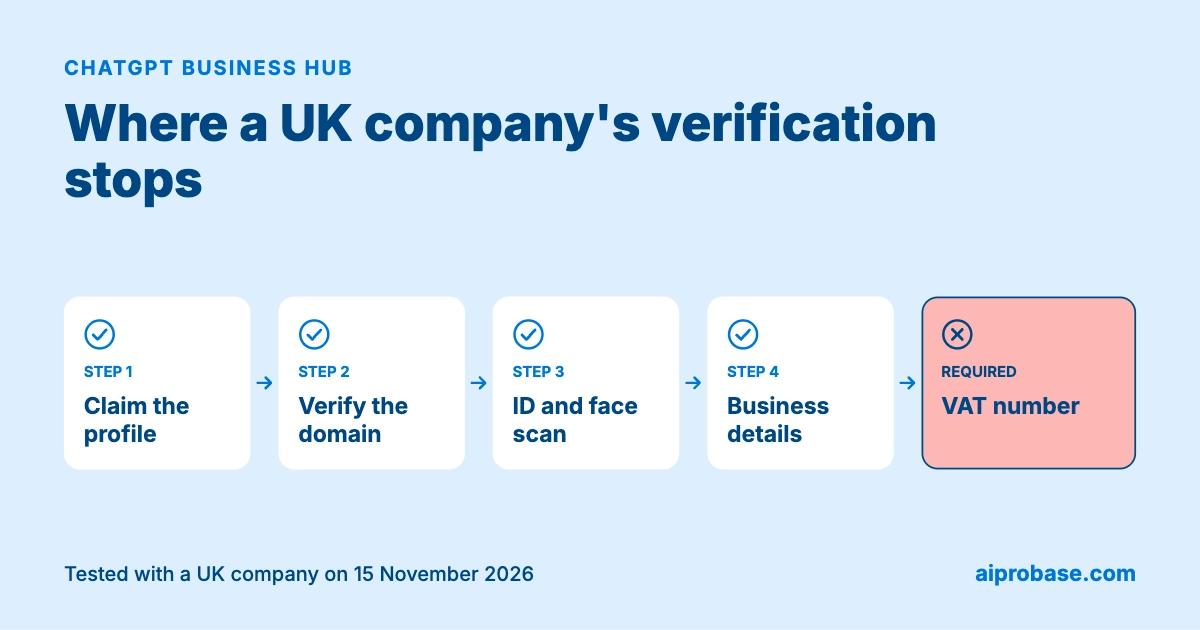
On 15 November 2026, five days after OpenAI opened Businesses in ChatGPT, we claimed a profile for our own company, AIPROBASE LTD, and recorded the whole session. The profile was created as a draft. Verification then stopped at one required field: a VAT number, which a UK company below the registration threshold does not have. A day later OpenAI Support confirmed that the check cannot be completed without one. If you run a small UK company and plan to claim your ChatGPT profile, this is what the process asks for and where it may stop.
Businesses in ChatGPT is a beta that lets a company claim the profile ChatGPT shows for it. It appears in OpenAI's release notes for 10 November 2026. Through a dashboard called Business Hub, a business can supply its details and product information and see how people engage with it, including mentions and website clicks, according to OpenAI's setup guide. Business agents, the assistants that answer customers inside ChatGPT, are limited to eligible e-commerce and online service businesses in the US.
The launch fits a wider shift in how AI agents are changing commerce. Three points in the setup guide are worth knowing before you start. Claiming does not guarantee more visibility. Local shops and restaurants can currently claim only an existing US listing, so the route we took is open to online businesses only. And ChatGPT may draw on other sources when it answers questions about your business.
Claiming took eight steps and no payment.
The draft screen then offered three next actions. Two of them were paid products: advertising credit for ChatGPT Ads and a ChatGPT Business plan.
Claiming means accepting the Businesses in ChatGPT Terms, last updated 9 November 2026. Four clauses matter to a small business. A claimed listing is not yours alone: section 4.1 says claiming "does not give you exclusive control over its contents", and OpenAI may add to, edit or replace what you submit using other sources. The display licence for basic details such as name, contact details, category and website is perpetual and irrevocable. Section 8 guarantees no placement, ranking or visibility. And section 10 contains a covenant not to sue and a release that extend to content published on your own websites.
We are not lawyers, and this is a summary, not advice. Read the terms before you click through the first screen.
Editing the profile requires proving who you are and then proving the company exists. Until both are done, "Edit business info", Products and the agent builder stay locked. We could not open the edit screen. According to OpenAI's setup guide it covers the website, description, category, logo, delivery and return policies, a cover photo and other optional details.
The check is run by Persona, a third-party identity vendor. The consent screen states that account information shared with Persona is stored for no more than 7 days and biometric information for no more than 30 days. You choose the country that issued your ID, pick a document type, photograph the document and complete a face scan. For a UK document the options were driving licence, PASS card, passport, residency permit and voter ID. The flow moved to a phone and did not hand back to the desktop browser.
Then comes a business form: legal name, trading name, country, sole proprietor or entity, registration number, VAT number, website, a physical address ("no PO boxes") and the registered address. This matches the setup guide, which says you may need a government ID, business registration information and proof that you are authorised to represent the business.
The business form requires a VAT number, and we do not have one. The field's hint reads "Enter a valid EU or UK VAT number including country code." Left empty, it shows "Required" and the form will not continue.
A UK company only has to register for VAT once its taxable turnover passes the £90,000 registration threshold. Below it, registration is optional, so a large share of small companies have no VAT number at all.
We asked OpenAI Support how a company in that position can complete the check. The reply on 16 November 2026 said: "we are unable to complete that verification without one." Support also asked us not to enter a different number in the field.
OpenAI's own guide points the other way. It tells applicants to make sure "any registration or tax number you provide" matches official records, which reads as if a tax number were optional. The form we saw treats it as required.
Three limits on this finding. It is a first-line support answer, not a published policy. The product is in beta and the form may change. And we tested one company, so we cannot say every UK business sees the same form.
The form has rough edges that are easy to trip over.
Claim the profile if you run an online business, and expect to stop at verification if you have no VAT number. A draft is not published, so until verification clears, claiming changes nothing about how you appear in ChatGPT. What you get is the claim itself, ready for the day the form changes. If you run a local shop or restaurant outside the US, you cannot add a listing yet.
Before you start, have these ready: access to your domain's DNS settings, a business email you can open, a government ID, and a phone with a camera. Decide in advance which physical address you are willing to give. A virtual office is your registered address, not a physical one, and the form asks for both.
Do not enter a number that is not yours to get past the VAT field. It is a business verification form, and a false entry can cost you the profile.
Keep the facts on your own website complete. Until verification goes through you cannot edit the profile, so your site is the one place where you control what is said about your hours, services and prices. How you present those facts matters too: one kind of AI search parses your markup, and one may never read it.
One company, one session: 15 November 2026, 14:53 to 15:35 GMT, Safari on macOS and an iPhone, with the desktop screen recorded throughout. We followed the website path only, and verification is incomplete. Disclosure: Aiprobase publishes structured business profiles, so we have a commercial interest in how AI systems source business facts.